Dota2PornFx Wards installation guide
Dota 2 Ward Mod Guide: Install and Restore Ward Skins
Choose a named upstream ward resource, keep a clean backup, install one VPK or ZIP change at a time, and use a repeatable test before you add another local replacement.

What a Dota 2 ward mod changes
A Dota 2 ward mod is a local replacement for the ward model, texture, or related game asset that your client loads. It changes what you see on your own installation; it does not grant a new inventory item, alter another player's screen, or turn a community file into an official cosmetic. A good Dota 2 ward mod guide therefore starts with boundaries: identify the resource, read its file type, keep the original source link, and plan how to undo the change.
The Wards category is separate from official item effects. An official ward is equipped through a Dota 2 loadout or inventory flow, while a local VPK or ZIP replacement is placed in game files and can stop working when a patch changes package priorities. If you only need to find the official item-effect slot, use the related loadout guide. Use this page when the task is choosing and testing a local ward resource.
Catalogue first
Check the resource name, preview, ZIP or VPK label, update date, and preserved upstream link before opening a download.
One change at a time
Install one ward package, reproduce the same test, and keep other visual files untouched so a conflict has a clear cause.
Rollback ready
Keep an untouched backup and a short change note outside the game folder so a failed test is reversible.
Choose a ward resource before downloading
Start at the Dota2PornFx Wards category rather than a random mirror. The current catalogue snapshot contains six entries: Slobbering Strongbox is a ZIP archive, while Trailgazer, Monty, Portal, Curious Snaptrap, and Floes Tower are VPK packages. The cards keep the original preview and source download URL, so you can compare the intended look and the package type before it touches your installation. The newest listed entry is Slobbering Strongbox, updated 2026-10-07; the other five entries are dated 2025-11-21 or 2025-11-22 in the checked catalogue.
A preview is an identity check, not a compatibility promise. Confirm that the name in the card matches the name in the archive, and save the original ZIP or VPK outside the Dota 2 directory. Prefer a resource with a clear file name and an obvious removal path. Avoid bundles that replace unrelated heroes, HUD files, sounds, or terrain when your goal is only a ward change; a narrow package makes testing and recovery easier.

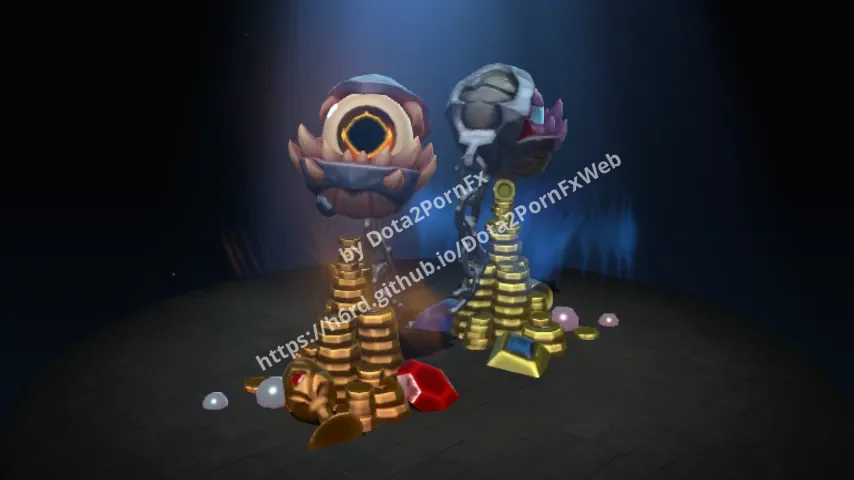
Slobbering Strongbox
Download ZIP
Trailgazer
Download VPK
Monty
Download VPK
Portal
Download VPK
Curious Snaptrap
Download VPK
Floes Tower
Download VPK- Open the Wards category and record the exact resource name, file type, update date, preview, and source link.
- Keep the original archive in a separate downloads folder; do not use a temporary browser copy as your only backup.
- Choose one narrow package instead of a bundle that changes several visual systems at once.
- Read any README or source note inside a ZIP before copying its folders.
- If a package has no identifiable source or no removal path, stop and choose a different resource.
Prepare a clean and reversible install
Before installing a Dota 2 ward mod, close the game and note the active Steam library that contains Dota 2. Multiple libraries can make a correct package look ineffective when it was copied to a different drive. Keep the source archive, a clean backup of any file you will replace, and a short change log outside the game directory. Write down the date, resource name, package type, and exact path you plan to change.
A clean baseline is more useful than a large backup with no explanation. If other local mods are already installed, disable or move them before this test when you can identify them. You want the first run to answer one question: does this ward package load on the current client by itself? Do not combine a ward mod with a HUD, terrain, shader, sound, or hero replacement until the single-package test is complete.
| Preparation check | Why it matters | Safe action |
|---|---|---|
| Active Steam library | A second library can contain the real game files. | Confirm the install location from Steam before copying anything. |
| Archive copy | You may need the original package after a failed test. | Store the untouched ZIP or VPK outside the game folder. |
| Clean backup | A replacement can be hard to identify later. | Copy the original target file or folder and label it with the date. |
| Other mods | Two packages can overwrite the same resource. | Temporarily move identifiable visual mods out of the test path. |
| Change log | Rollback depends on knowing what changed. | Record the resource, path, file name, and removal step. |
- Close Dota 2 and keep Steam finished with any pending update.
- Confirm the package is the Wards resource you selected, not a similarly named hero or item pack.
- Back up the documented target and leave the original source archive untouched.
- Prepare a simple practice or demo scene where the ward is easy to see.
Install VPK or ZIP files one at a time
VPK and ZIP are package formats, not interchangeable instructions. A VPK resource such as pak12_dir.vpk may be intended for a specific game asset path, while a ZIP may contain a ready-to-copy folder, a VPK inside a folder, or several files that belong together. Open a ZIP first and match its top-level folders to the source notes. Do not copy both an outer folder and its nested dota folder when the result would add an extra directory level.
For a VPK, keep the supplied file name unless the current source instructions explicitly name a destination or package slot. Do not rename pak10_dir.vpk to another number because it feels more convenient; package order and resource scope can matter. For a ZIP, extract to a temporary folder, inspect the contents, and copy only the documented structure. If the source instructions are missing, treat that as an information gap and test only after you have a reversible backup.
- Read the package notes and identify the exact target path before extracting files.
- Copy one VPK or one documented ZIP structure, then stop; do not add a second ward package during the same test.
- Keep the original file and clean backup outside the game folder, and write down the changed path.
- Launch the game once and use the same practice or demo scene for the first visual check.
- If the package is not visible, remove it before trying a different folder or another resource.
| Package clue | Likely meaning | What to verify |
|---|---|---|
| pak*_dir.vpk | A packaged local replacement with a specific file name. | Use the source path and keep the file name unless instructed otherwise. |
| ZIP with one folder | The folder may already mirror the target directory. | Check whether copying the folder adds an unwanted extra level. |
| ZIP with several VPK files | The pack may contain related resources or variants. | Read the notes and install only the intended variant. |
| README missing | The package has an incomplete installation contract. | Keep a backup and stop if you cannot identify a removal path. |
Test the ward mod and isolate failures
Use a repeatable test instead of judging the change from a busy match. Start the same demo or practice scene, place the same Observer or Sentry ward, and view it from a similar distance. If the model or texture changes, record that the package loaded on this client. That result is useful but narrow: it does not prove compatibility with every mode, future patch, or another player's view.
If the default ward still appears, check the active game path and the exact target path from the source notes before copying the package again. An archive nested one level too deep, a duplicate library, or another VPK with higher priority can make a correct file look ineffective. Remove the newest change before adding a cache command, a launch flag, or a second package. Troubleshoot one variable at a time.
| Symptom | First check | Avoid as a first response |
|---|---|---|
| The default ward is still visible | Confirm the Steam library, target path, and package name. | Copying the same archive into several folders. |
| The game loads but the wrong model appears | Disable other VPK or visual replacements and repeat the scene. | Renaming packages without a source instruction. |
| The game closes or shows missing assets | Move the new package out and verify the clean baseline. | Stacking a terrain, HUD, shader, and ward change together. |
| The ward worked before a patch | Test the unmodified client and check the source date. | Reapplying an old installation command from memory. |
| Two ward packages interfere | Enable one package at a time and compare the same scene. | Changing file names and load order at the same time. |
Restore the default ward after an update
When an update changes the result, reverse the newest identifiable change first. Close Dota 2, move the replacement VPK or extracted folder to a separate backup location, and restore the clean file or folder you copied before installation. Launch once without other custom files. This tells you whether the patch exposed a ward-specific incompatibility or whether another local change is responsible.
If official files remain missing or damaged after your identified changes are removed, use Steam's installed-files verification as a recovery step. Verification repairs the game installation; it is not a Dota 2 ward mod manager and it can replace local changes. Keep any community archive outside the game directory before running it, then test the clean client before installing a newer package.
- Close Dota 2 and note the last package or folder you changed.
- Move that replacement out of the game path instead of deleting your only copy.
- Restore the clean backup, launch once, and confirm the default ward renders.
- If official files still fail, verify installed files through Steam and read the result in context.
- Only after the baseline is stable should you test a different ward resource.
Compatibility, account safety, and source limits
Dota2PornFx entries are community resources, not Valve products. A successful local visual test does not prove that a package is supported in every mode, safe for an account, malware-free, or compatible with a future Dota 2 patch. Keep the source URL, inspect downloads before opening them, and stop when a file asks for unrelated credentials, offers no identifiable origin, or cannot be removed cleanly. When you are unsure whether a change is permitted or compatible, return to the clean client and consult current official guidance.
Dota 2 ward mod FAQ
Continue with Dota 2 mod guides
Sources and freshness check
- Dota2PornFxWeb upstream repository — Upstream repository checked on 2026-11-15 for the source catalogue and preserved download model.
- Dota2PornFx live source — Live source checked on 2026-11-15; it still exposes Wards as a catalogue category.
- Steam Support: Dota 2 Workshop - Wards — Official ward model, material, animation, hitbox, attachment, portrait, and troubleshooting guidance used to frame the source boundary.
- Steam Support: Verify Integrity of Game Files — Official recovery reference for a clean installation after identifiable local changes are removed.